Instead of relying on scattered spreadsheets and binders, teams centralise hazards, controls, monitoring records, and corrective actions in one place. That alone can change how confidently they walk into an audit.
How does HACCP plan software make documentation easier?
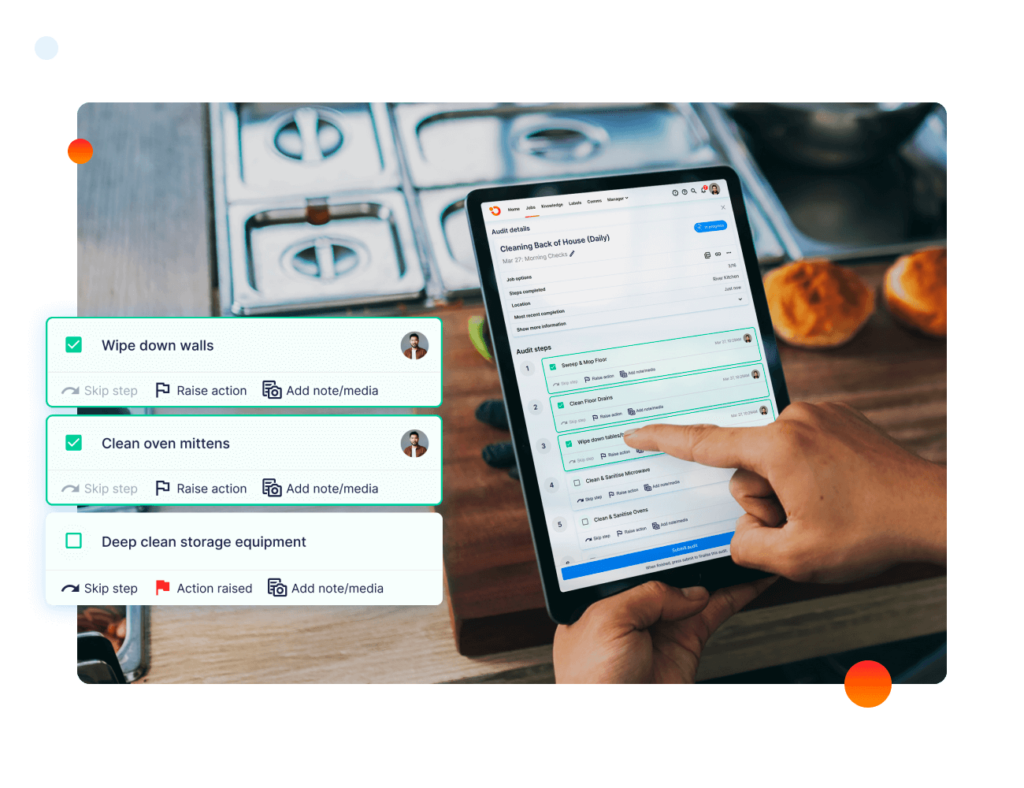
It simplifies documentation by standardising what they capture and where it lives. Templates, required fields, and guided workflows reduce the “did they forget something?” problem that causes gaps in HACCP records.
Because everything is stored in a consistent format, they spend less time formatting documents and more time verifying that controls are working. Most systems also reduce duplicate entry by reusing product, process, and site data across forms.
What HACCP records can they manage in one system?
They can usually manage the full set of HACCP and food safety documentation in one place. That includes hazard analyses, CCP determinations, critical limits, monitoring logs, verification activities, deviations, and corrective actions.
From an operational integration perspective, haccp plan software should extend beyond core critical control points to encompass prerequisite programmes such as sanitation management, allergen controls, maintenance verification, training documentation, supplier approvals, and traceability logs. When these elements are consolidated within a single system, audits shift from reactive document retrieval to proactive demonstration of structured, end-to-end control.
How does it improve version control and change management?
It improves version control by keeping a single source of truth with tracked edits. When they update a hazard analysis, revise a critical limit, or change a monitoring frequency, the system can record who changed what and when.
That reduces the risk of teams following outdated procedures on the floor. It also supports audit readiness because they can show a clear history of plan updates, approvals, and effective dates without manually comparing files.
How does it reduce errors in monitoring and corrective actions?
It reduces errors by prompting the right checks at the right time and flagging values that fall outside limits. If a monitoring entry is missed or a reading is out of range, the system can trigger alerts so supervisors act quickly.
Corrective action workflows also become clearer because they can link the deviation, root cause notes, affected lots, disposition decisions, and verification steps in a single chain. That makes it easier to prove they responded properly, not just that they logged the incident.
How does it help them prepare for audits faster?
It speeds up audit preparation by making evidence easy to find and export. Instead of flipping through binders or searching shared drives, they can filter by date, line, product, CCP, or operator and pull complete records within minutes.
Many tools also allow them to generate audit packs, export PDFs, and share read-only access with auditors. The time savings add up most when auditors ask for “the last 3 months” of records across multiple controls.
What makes audit trails and accountability clearer?
It makes accountability clearer by attaching names, timestamps, and actions to every record. When an auditor asks who performed a check, who reviewed it, and who approved a corrective action, the answers are built into the log.
This also reduces internal disputes because responsibility is visible. If a task was skipped, they can see whether it was never assigned, never completed, or completed but not reviewed.
How does it support multi-site or multi-line operations?
It supports multi-site control by standardising policies while still allowing site-level differences. Corporate teams can set common HACCP structures and forms, while each facility adapts monitoring points, frequencies, and equipment references.
Roll-up reporting is another advantage. When leadership needs trends, they can compare deviations, completion rates, and recurring issues across locations without building manual reports.
What should they look for when choosing HACCP plan software?
They should look for software that matches how their plant actually runs. The best features are the ones teams will use daily, not the ones that only look good in a demo.
Key checks include ease of data entry, offline capability if needed, configurable workflows, strong permissions, clear audit trails, practical exports, and support for prerequisite programmes. They should also confirm the vendor can help with implementation, training, and ongoing updates.
How should they implement it without disrupting production?
They should implement it in phases with one process area or one programme first. A controlled rollout lets teams fix workflows, refine forms, and train users without overwhelming the floor.
It also helps to migrate only what they need for audit readiness, then expand. When they treat the project as a change in habits, not just a software install, adoption becomes smoother and the audit benefits show up faster.
What is the bottom line on documentation and audits?
HACCP plan software simplifies documentation by making it structured, consistent, and easy to retrieve. It simplifies audits by turning proof of control into something they can produce quickly, confidently, and with less manual effort.
For teams tired of chasing paperwork, the real win is not just saving time. It is building a system where the records match the reality of how they manage food safety every day.
FAQs (Frequently Asked Questions)
How does HACCP plan software simplify documentation and reduce errors?
HACCP plan software simplifies documentation by standardising data capture through templates, required fields, and guided workflows, reducing gaps in records. It stores information in consistent formats, cutting down on formatting time and duplicate entries, allowing teams to focus on verifying controls rather than paperwork.
What types of HACCP and food safety records can be managed within one software system?
Most HACCP plan software allows management of the full range of HACCP documents including hazard analyses, CCP determinations, critical limits, monitoring logs, verification activities, deviations, and corrective actions. Additionally, many platforms support prerequisite programmes like sanitation, allergen control, maintenance checks, training records, supplier approvals, and traceability logs.
In what ways does HACCP plan software improve version control and change management?
HACCP plan software maintains a single source of truth with tracked edits that record who made changes and when. This ensures teams follow up-to-date procedures and supports audit readiness by providing clear histories of plan updates, approvals, and effective dates without manual comparisons.
How does using HACCP plan software enhance audit preparation efficiency?
The software centralises all relevant records in an easily searchable system where users can filter by date, line, product, CCP, or operator to quickly retrieve complete documentation. Many tools also generate audit packs and export PDFs for sharing with auditors, significantly reducing the time spent gathering evidence during audits.
What features make accountability and audit trails clearer with HACCP plan software?
Accountability is enhanced by attaching names, timestamps, and specific actions to every record. This transparency allows auditors to identify who performed checks, reviews, or approvals while reducing internal disputes by clearly showing task assignments and completion status within the logs.
How can HACCP plan software support multi-site or multi-line food production operations effectively?
The software standardises policies across multiple sites while allowing customization for site-specific monitoring points and equipment references. It enables corporate teams to set common structures while facilitating roll-up reporting for leadership to compare deviations and trends across locations without manual report building.
Learn more Temperature Monitoring Systems for Restaurants and Aged Care